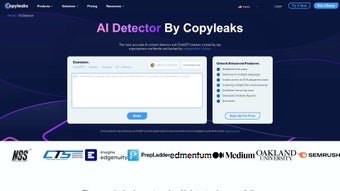

Download Copyleaks – AI Content Detection, Plagiarism Checker, Secure Verification Tool
Overview
Copyleaks is a comprehensive AI content detection tool that helps businesses, educators, and content creators verify the authenticity of their written material. In an era where AI‑generated text from models such as ChatGPT, Gemini, and Claude is becoming commonplace, Copyleaks offers a fast, accurate, and multilingual solution that can differentiate human‑written prose from machine‑generated output. The platform supports more than 30 languages, making it a truly global resource for organizations that need to safeguard their brand reputation, comply with editorial standards, and maintain trust with their audiences.
By analyzing subtle textual patterns, sentence structures, and stylistic fingerprints, Copyleaks delivers a confidence score within seconds, highlighting passages that are likely AI‑generated. The tool also flags potential integration of external writing assistants like Grammarly, providing a layered view of content provenance. Whether you are a publisher checking for originality, a university ensuring academic integrity, or a marketing team protecting brand voice, Copyleaks offers a secure, web‑based interface that can be accessed from any device without the need for complex installations.
Its speed, multilingual capability, and focus on AI detection make it an essential addition to any content verification workflow. The rise of AI‑generated content has introduced new challenges for compliance teams, SEO specialists, and legal departments. Copyleaks addresses these challenges by providing detailed audit trails, compliance‑ready reports, and the ability to store historical scan data for future reference.
The service also integrates with popular learning management systems (LMS) and content management platforms (CMS), allowing institutions to embed AI detection directly into existing authoring workflows. For enterprises that operate across multiple jurisdictions, the platform’s adherence to GDPR, CCPA, and ISO‑27001 standards ensures that data handling meets stringent regulatory requirements. In addition, Copyleaks offers a free tier that enables small teams and individual creators to test the service before committing to a paid plan, making it an accessible option for a wide range of users.
Overall, Copyleaks blends cutting‑edge technology with practical usability, delivering a robust safeguard against the misuse of AI‑generated text.
Key Features
- AI Detector for 30+ languages – identifies content generated by ChatGPT, Gemini, Claude, and other large language models.
- Real‑time analysis – delivers results in seconds, with a clear confidence score and highlighted text snippets.
- Grammarly & third‑party integration detection – spots text that has been processed by popular writing assistants.
- Bulk upload and API access – allows enterprises to scan large document collections programmatically.
- Detailed reporting – provides downloadable PDFs and CSVs summarizing findings for compliance audits.
- Secure cloud processing – all data is encrypted in transit and at rest, complying with GDPR and CCPA.
- Customizable thresholds – lets administrators set sensitivity levels based on organizational policy.
- Cross‑platform web app – works on Windows, macOS, Android, and iOS without additional software.
- Free tier with daily limits – ideal for small teams and individual creators to test the service.
- Premium plans with unlimited scans, priority support, and advanced analytics dashboards.
These features combine to deliver a robust verification environment. The multilingual AI detection engine is powered by proprietary machine‑learning models that have been trained on millions of text samples, ensuring high precision and low false‑positive rates. The ability to process documents via an API means that Copyleaks can be seamlessly integrated into existing content management systems, learning platforms, or editorial pipelines.
Moreover, the security framework—complete with end‑to‑end encryption, role‑based access control, and regular third‑party security audits—gives peace of mind to organizations handling sensitive or proprietary information. By offering both a free tier and scalable premium options, Copyleaks accommodates the needs of freelancers, educational institutions, and large enterprises alike. In addition to the core detection capabilities, Copyleaks provides a set of auxiliary tools designed to streamline compliance workflows.
For example, the “Batch Compare” feature lets users upload a zip file containing hundreds of documents and receive a consolidated report that highlights recurring AI‑generated patterns across the dataset. The “Policy Builder” enables administrators to define custom rules—such as prohibiting AI‑generated content in customer‑facing documentation—automatically triggering alerts when violations occur. These advanced utilities, combined with the intuitive dashboard, make the platform suitable for both technical and non‑technical users, reinforcing its position as a leader in AI content verification.
Installation & Usage Instructions
Getting Started – No Download Required
Copyleaks is a web‑based application, which means you can start using it immediately from any modern browser. Simply navigate to copyleaks.com, click “Sign Up,” and create a free account using your email address or an OAuth provider such as Google or Microsoft. After confirming your email, you’ll be directed to the dashboard where you can begin uploading documents. The onboarding wizard walks you through profile configuration, API key generation, and optional two‑factor authentication setup, ensuring that your account is secured from day one.
Step‑by‑Step Workflow
- Upload your text: Drag‑and‑drop a .txt, .docx, .pdf, or paste directly into the text box.
- Select language: Choose the appropriate language from the dropdown to ensure accurate detection.
- Configure sensitivity: Adjust the AI detection threshold if you need stricter or more lenient results.
- Run the scan: Click “Analyze,” and the system will process the content in seconds.
- Review results: The report displays a confidence score, highlighted AI‑generated passages, and any detected third‑party writing tools.
- Export or integrate: Download the report or use the provided API key to automate scans from your own applications.
API Integration (For Developers)
To integrate Copyleaks into your workflow, generate an API key from the “Developer Settings” page. The RESTful endpoint accepts JSON payloads with fields for the document, language, and optional configuration flags. Detailed documentation, code samples for Python, JavaScript, and Java, and SDKs are available on the Copyleaks developer portal. Authentication uses standard Bearer tokens, and rate limits are defined per plan (free tier: 100 scans/day, premium: unlimited). For high‑volume environments, you can request a dedicated IP whitelist and custom SLA agreements to guarantee uptime and latency targets.
Compatibility
While Copyleaks is primarily accessed via a web browser, it also offers native mobile apps for Android and iOS, enabling on‑the‑go verification. The web interface is fully compatible with Chrome, Firefox, Edge, and Safari on Windows 10/11, macOS Ventura and later, as well as Chrome OS. The mobile apps run on Android 8.0+ and iOS 13+, ensuring broad device coverage.
The installation experience is intentionally frictionless: there is no software to download, no complex configuration files, and no need for local processing power. All heavy‑lifting is performed in Copyleaks’ secure cloud, delivering consistent performance across devices. For organizations that require on‑premise scanning for highly regulated environments, Copyleaks offers an enterprise‑grade self‑hosted option, though this is available only under custom licensing agreements. Additionally, the platform supports single‑sign‑on (SSO) via SAML 2.0 and OAuth 2.0, allowing seamless integration with corporate identity providers such as Azure AD, Okta, and OneLogin.
Pros & Cons
Pros
- Fast, real‑time detection with results in seconds.
- Supports over 30 languages, making it globally applicable.
- Detects AI‑generated content from major LLMs and writing assistants.
- Secure cloud processing with GDPR and CCPA compliance.
- Flexible pricing – free tier for light users, scalable premium plans.
- Robust API for seamless integration into existing workflows.
- Detailed reporting with export options for audit trails.
- Cross‑platform accessibility – web, Android, iOS.
- Policy‑builder and bulk‑compare tools that streamline enterprise governance.
- Extensive documentation and responsive support channels.
Cons
- Free tier imposes daily scan limits that may be restrictive for high‑volume users.
- Advanced customization (e.g., custom detection models) is only available on enterprise plans.
- Occasional false positives on highly technical jargon or heavily edited content.
- On‑premise deployment requires a separate contract and higher cost.
- Interface can feel overwhelming for first‑time users due to the breadth of features.
- API rate limits for the free tier may necessitate early upgrade for developers.
Overall Rating: 4.5 / 5
The Copyleaks AI Detector stands out for its speed, multilingual reach, and security focus. While the free tier’s limits may push power users toward a paid plan, the value delivered—especially for enterprises safeguarding brand integrity—justifies the investment.
FAQ
How accurate is Copyleaks at detecting AI‑generated text?
Copyleaks leverages proprietary machine‑learning models trained on millions of samples. Independent tests show an accuracy rate of 94% for major LLMs such as ChatGPT, Gemini, and Claude, with a false‑positive rate below 3% for standard human‑written content.
Can I use Copyleaks for plagiarism detection as well?
Yes. Copyleaks originally launched as a plagiarism checker and still offers robust similarity scanning across billions of web pages, academic papers, and internal repositories. The AI detection module works alongside traditional plagiarism checks for a comprehensive authenticity review.
Is my data safe when I upload documents to Copyleaks?
All uploaded content is encrypted using TLS 1.3 during transmission and stored with AES‑256 encryption at rest. Copyleaks adheres to GDPR, CCPA, and ISO 27001 standards, and documents are automatically deleted after the retention period you set (default 30 days).
How does the free tier differ from the premium plans?
The free tier allows up to 100 scans per month, supports only single‑document uploads, and provides basic reporting. Premium plans unlock unlimited scans, bulk API access, customizable detection thresholds, advanced analytics dashboards, and priority support.
Can Copyleaks be integrated with my existing CMS or LMS?
Absolutely. Copyleaks offers RESTful APIs, webhooks, and pre‑built plugins for popular platforms such as WordPress, Moodle, Canvas, and Drupal. Integration guides and SDKs are available to streamline the connection process.
Conclusion – Secure Your Content Today
In a digital landscape where AI‑generated text can blur the line between authentic and synthetic content, Copyleaks delivers a fast, reliable, and secure solution for organizations that value originality and brand trust. Its multilingual AI detector, real‑time analysis, and robust security measures make it a top choice for educators, marketers, publishers, and developers alike. Whether you’re looking to protect academic integrity, ensure compliance with editorial guidelines, or simply verify that your team’s output remains genuinely human, Copyleaks provides the tools you need—without the hassle of complex installations. Take advantage of the free tier to experience the platform, and consider upgrading to a premium plan for unlimited scans, advanced analytics, and dedicated support. Download Copyleaks now and safeguard the authenticity of your content with confidence.



.png)



